 Mo
Mo Help › Inventory
Stock items
A stock item is one thing you buy or sell. Set it up once with its unit, group and opening stock; every voucher after that keeps its quantity and value up to date.
Create an item
- List of Masters → Stock Items → New. In a voucher, Alt+C in the item field creates one on the spot.
- Type the Name, choose Under (Stock Group) and the Primary Unit.
- With GST on: GST Applicable, HSN / SAC Code, GST Rate % and taxability.
- Enter the Opening Qty and Opening Rate if you already hold stock.
- Save with Ctrl+A.
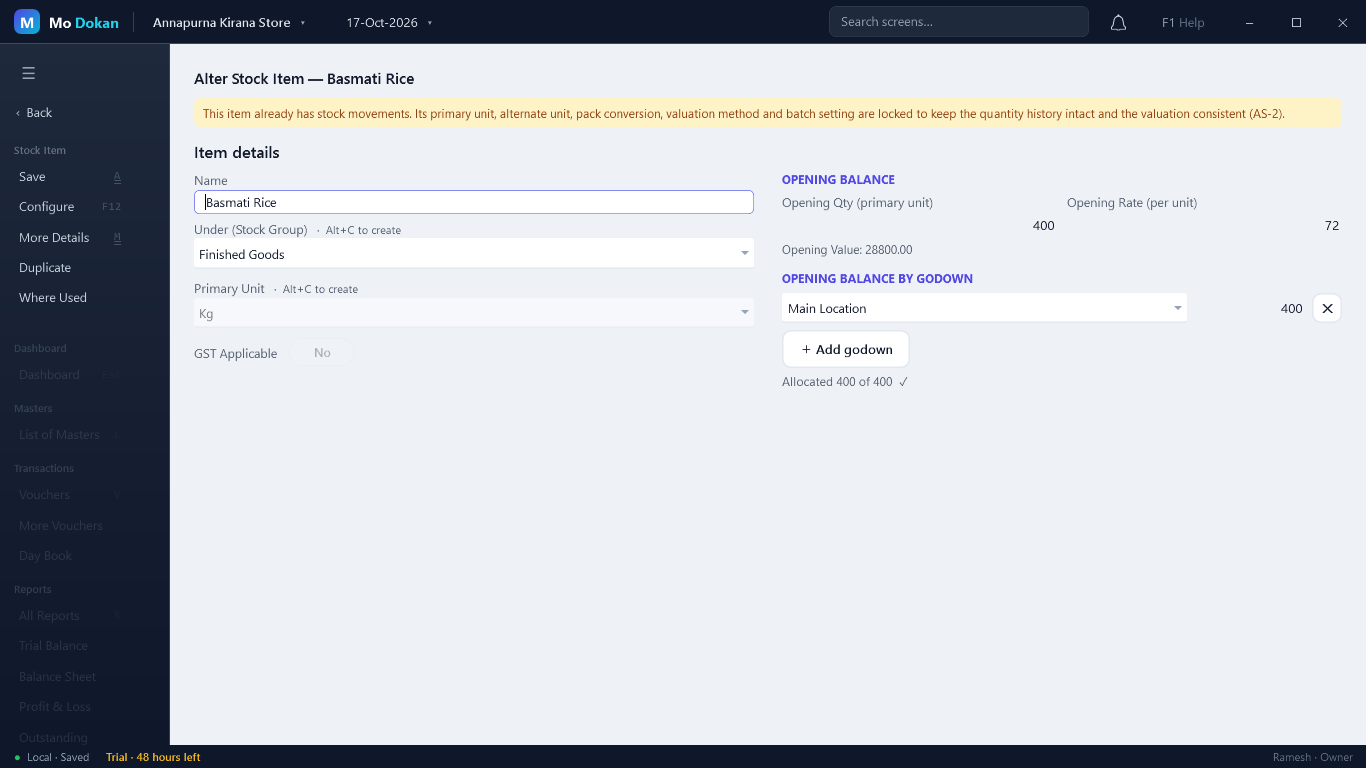
Opening stock
Enter the quantity and rate on the day your books begin; the value is worked out. With several godowns, split it under Opening Balance by Godown (+ Add godown).
RuleThe opening quantity must be fully allocated to godowns, each godown appearing only once.
More Details (F12)
| Section | Fields |
|---|---|
| Identification | Alias, part number, barcode, serial number, brand, description, specification. |
| Units & valuation | Alternate (pack) unit and conversion, weight, category, valuation method, standard cost, batches, default godown, expiry / MRP / barcode tracking. |
| Pricing & levels | MRP, purchase rate, sales rate, and reorder, minimum and maximum levels. |
| GST & statutory | Type of supply, input tax credit eligibility, cess, TDS/TCS nature, GST on MRP, reverse charge, rates inclusive of tax. |
| Manufacture | Set Components (BoM) — the bill of materials (see Manufacturing). |
| Default accounting allocations | The sales and purchase ledgers this item normally uses. |
| Stock item behaviour | Ignore negative balances; ignore differences from physical counting. |
Reorder levels
Set a Reorder Level on each item, or several at once in List of Masters → Reorder Levels. Items at or below it show in the dashboard's Low stock list and in the reorder report.
Rules
RuleThe name is required and must be unique; a primary unit is required; quantities, rates and levels cannot be negative.
RuleOnce an item has stock movements, its primary unit, pack unit and conversion, valuation method and batch setting are locked, so its quantity history and value stay consistent. The valuation method is changed only through the Valuation button.
RuleAn item used in vouchers or orders, or as a component in another item\’s bill of materials, cannot be deleted.
Alter, duplicate, many at once
From the Stock Items list: Alter, Delete, Multi Items (many items in one grid), + Batch. On an item: Duplicate and Where Used.