 Mo
Mo Help › Accounting
Voucher types
Each voucher type — Sales, Payment, and so on — has its own settings for numbering, approval and printing. List of Masters → Voucher Types, then open a type.
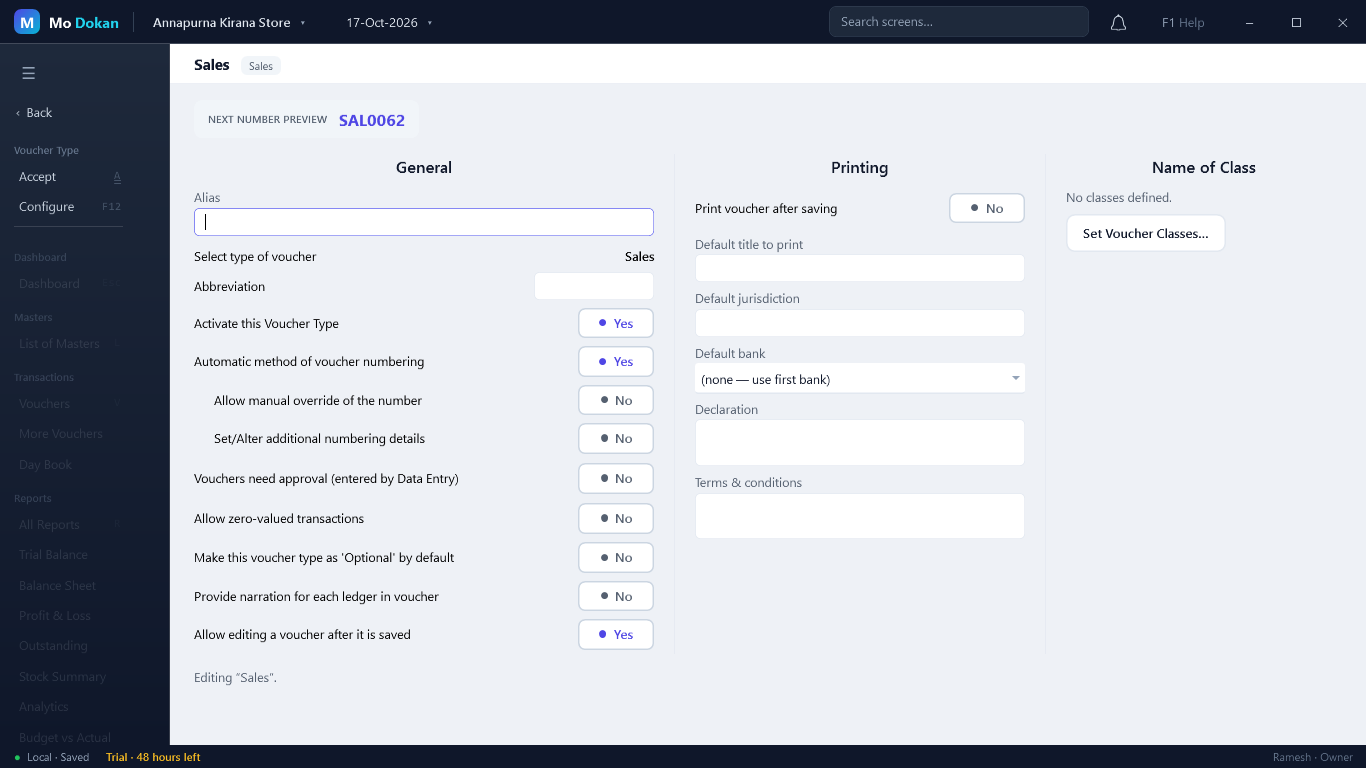
Settings
| Setting | What it does |
|---|---|
| Activate this Voucher Type | New companies have Payment, Receipt, Contra, Journal, Sales and Purchase active; the others switch on the first time you use them. |
| Automatic method of voucher numbering | Mo Dokan numbers each voucher. Off: you type a number on each voucher. |
| Allow manual override of the number | Automatic numbers, but you may type a different one. |
| Set/Alter additional numbering details | Prefix, suffix, width, starting number, and restarting each year or month. |
| Manage Series… | More than one numbering series for the same type, such as one per counter. |
| Renumber vouchers on deletion | Yes: later vouchers move up to close the gap. No: they keep their numbers. |
| Vouchers need approval (entered by Data Entry) | Vouchers entered by Data Entry users wait for an Owner or Accountant to approve them before they count. |
| Allow zero-valued transactions | Allows a voucher with no value — free samples, replacements. |
| Make this voucher type as \’Optional\’ by default | New vouchers of this type start outside the books, as optional. |
| Provide narration for each ledger in voucher | A separate narration on every line. |
| Allow editing a voucher after it is saved | No: once a voucher of this type is in the books it cannot be changed — Edit is greyed out, and a mistake is corrected by cancelling it (Alt+X) and entering a new one. A voucher still waiting for approval, or kept Optional, is not in the books yet, so it can still be approved or made Regular. |
| Printing | Print after saving, default title, jurisdiction, default bank, declaration, terms and conditions. |
| Set Voucher Classes… | Preset ledgers and splits for quick entry. |
TipThe Next number preview at the top shows the number the next voucher will really get, and follows any prefix or width you change before saving.