 Mo
Mo Ledgers
A ledger is one account: a customer, a supplier, a bank account, an expense such as rent. Each ledger sits under a group, which decides what kind of account it is.
Create a ledger
- List of Masters (L) → Ledgers → New.
- Type the Name and choose Under Group. The screen shows only the fields that group needs.
- Enter the Opening Balance, if any, and choose Dr or Cr.
- Save with Ctrl+A. The form clears for the next ledger; Esc when you are done.
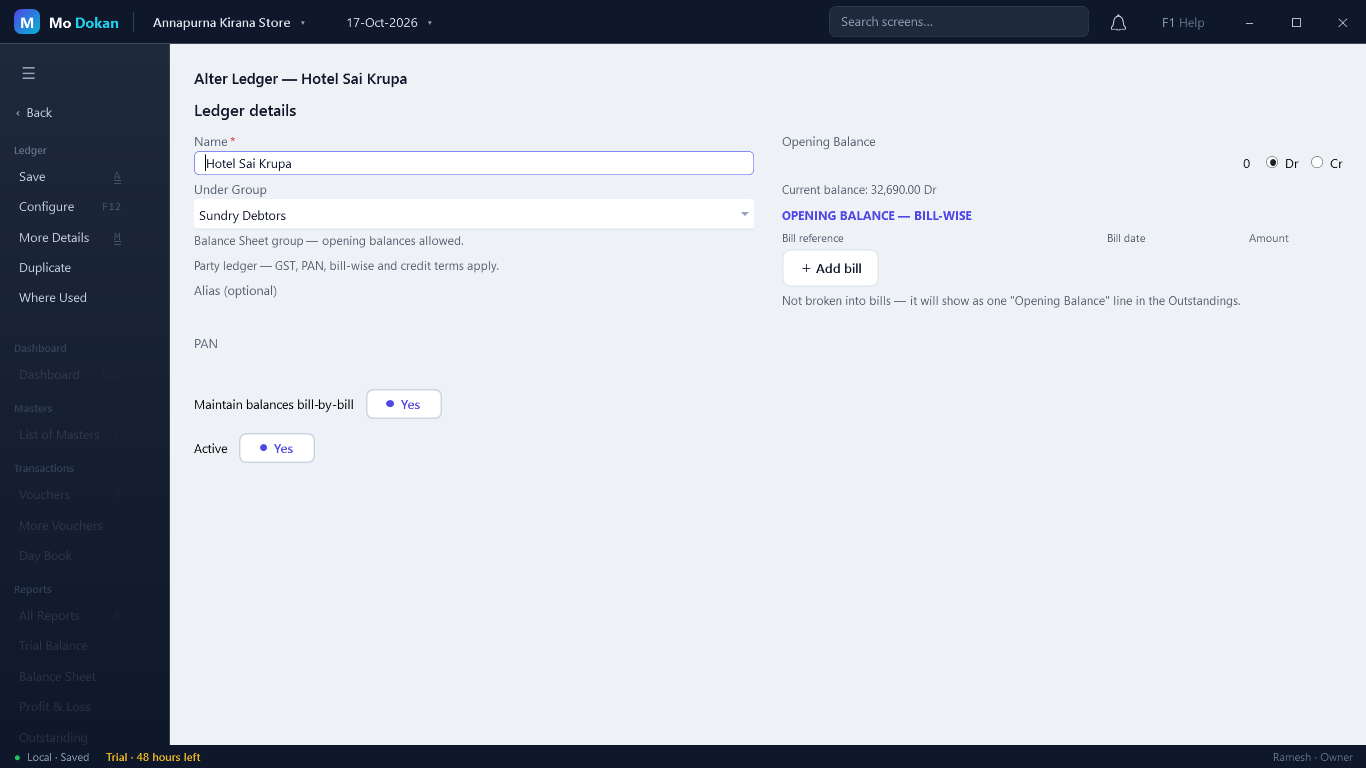
What each kind of ledger asks for
| Under | Extra fields |
|---|---|
| Sundry Debtors / Creditors (parties) | GSTIN, PAN, Maintain balances bill-by-bill, Credit Limit, Type of Supply, and opening bills. |
| Bank Accounts | Bank A/C No. and IFSC. |
| Duties & Taxes | GST Tax Head (CGST, SGST, IGST, Cess) when GST is on. |
| Everything else | Name, group and opening balance. |
More fields are under More Details (F12): registration type, state and place of supply, address and contact, ship-to address, credit period in days, UPI ID, price level, HSN/SAC and GST rate, cost centres, interest calculation, TDS/TCS, MSME details, e-Invoice and e-Way Bill, cheque printing.
Opening balances
Starting mid-way? Enter each ledger's balance on the day your books begin: what customers owe you (Dr), what you owe suppliers (Cr), your bank and cash balances (Dr), your capital (Cr).
Opening bills (customers and suppliers)
For a party that keeps bill-by-bill balances, break its opening balance into the unpaid bills: + Add bill, then the bill reference, date and amount. Those bills then appear in the outstandings with their real age.
What Mo Dokan checks
- The name is required and must be unique.
- A GSTIN must be 15 characters with a correct check digit; a PAN 10 characters (ABCDE1234F); and the PAN must match the one inside the GSTIN.
- The opening balance cannot be negative — choose Dr or Cr instead.
Alter, duplicate, delete
| To | Do this |
|---|---|
| Alter | Ledgers list → select → Alter, or Ctrl+Enter on the ledger in any report. |
| Copy a similar ledger | Open it → Duplicate: a new ledger with the same details, ready for a new name. |
| See where it is used | Open it → Where Used. |
| Create many at once | Multi Ledgers on the Ledgers list: one row per ledger. |
| Stop using a ledger | Set Active to No. It stays in old vouchers and reports, but new vouchers cannot use it. |
| Delete | Only a ledger that has never been used. Delete Unused removes all such ledgers at once. |