 Mo
Mo Help › Accounting
Groups
A group says what kind of account a ledger is — an asset, a liability, an income or an expense — and so where it shows in the Balance Sheet or Profit & Loss. Every company starts with the standard groups.
The standard groups
| Group | Inside it | Shows in |
|---|---|---|
| Capital Account | Reserves & Surplus | Balance Sheet — liabilities |
| Loans (Liability) | Bank Loan, Secured Loans, Unsecured Loans, Bank OCC A/c, Bank OD A/c | Balance Sheet — liabilities |
| Current Liabilities | Sundry Creditors, Duties & Taxes, Provisions | Balance Sheet — liabilities |
| Branch / Divisions, Suspense A/c | — | Balance Sheet — liabilities |
| Fixed Assets | Building, Furniture, Machinery | Balance Sheet — assets |
| Current Assets | Cash-in-hand, Bank Accounts, Sundry Debtors, Stock-in-hand, Deposits (Asset), Loans & Advances (Asset) | Balance Sheet — assets |
| Investments, Misc. Expenses (Asset) | — | Balance Sheet — assets |
| Sales Accounts, Direct Incomes | — | Trading account (gross profit) |
| Purchase Accounts, Direct Expenses | — | Trading account (gross profit) |
| Indirect Incomes, Indirect Expenses | — | Profit & Loss (net profit) |
Sundry Debtors are your customers and Sundry Creditors your suppliers. Ledgers under these two are parties: they keep bills, credit limits and GST details.
Create a group
- List of Masters (L) → Groups → New.
- Type the Name and choose Under — the group it belongs to (for example “Retail Customers” under Sundry Debtors).
- Save with Ctrl+A.
Make your own groups when you want reports to show a total for a set of ledgers — customers by area, expenses by type.
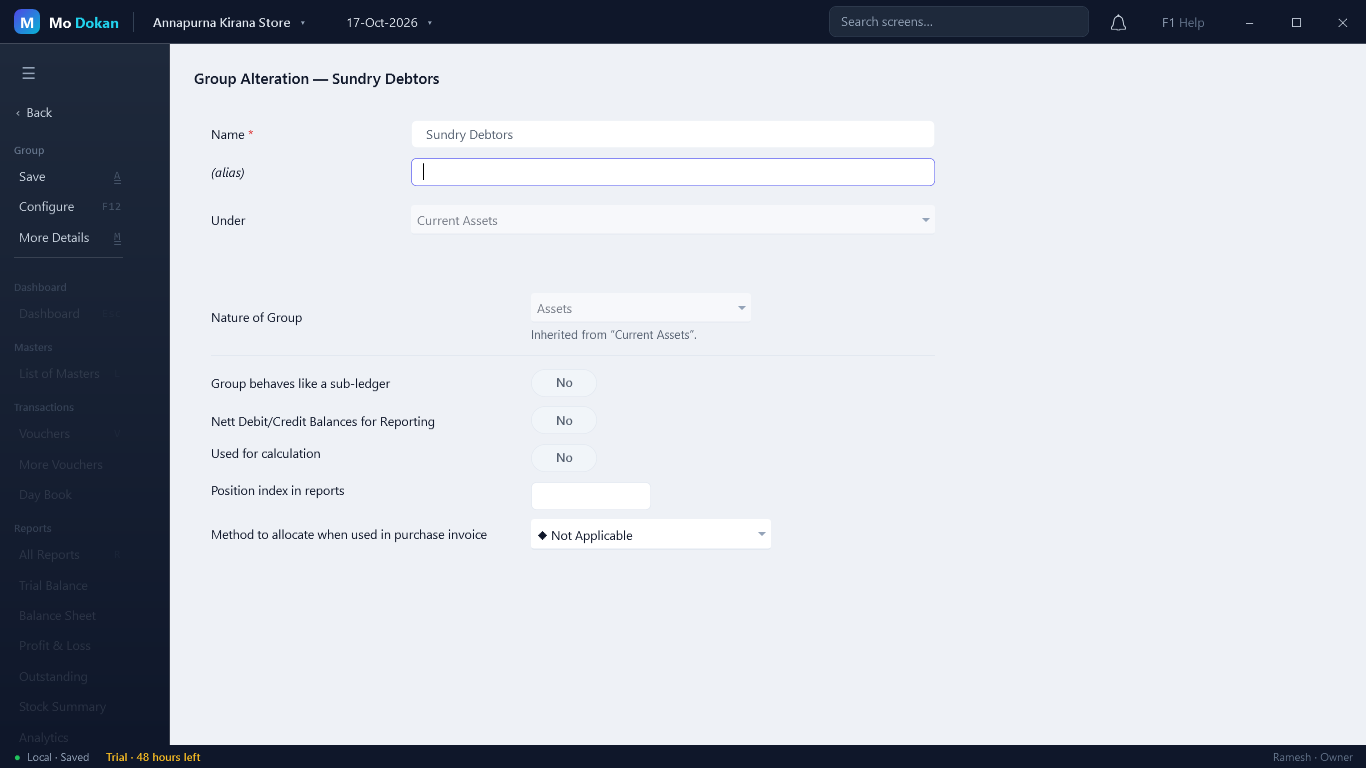
Every field
| Field | What it does |
|---|---|
| Name *, (alias) | The group\’s name, and another name it can be found by. |
| Under | Its parent group. Primary makes it a top-level group. |
| Nature of Group | Assets, Liabilities, Income or Expenses. Chosen only for a top-level group; a group under another inherits its nature. |
| Does it affect gross profits? | Only for income and expense groups. Yes puts it in the Trading account (gross profit); No in Profit & Loss (net profit). |
| Group behaves like a sub-ledger | Reports show the group as one line, with its ledgers inside it. |
| Nett Debit/Credit Balances for Reporting | Reports show one net figure for the group instead of separate debit and credit totals. |
| Used for calculation | Its ledgers can be used to work out taxes and charges on invoices. |
| Position index in reports | A number that sets the group\’s order among its neighbours in reports. |
| Method to allocate when used in purchase invoice | How an expense under this group (freight, loading) is spread over the items of a purchase. |
| HSN/SAC and GST rate details | On sales, purchase and trading groups when GST is on: the HSN/SAC and GST rate that ledgers and items under the group take, unless they set their own. |
| Set/Alter TDS / TCS details | Tax deducted or collected at source for ledgers under the group (when TDS or TCS is on). |
Rules
RuleThe standard groups cannot be deleted, and the ones Mo Dokan relies on (Sundry Debtors, Cash-in-hand, Bank Accounts, Sales and Purchase Accounts…) keep their name and place.
RuleA group can be deleted only when it has no groups and no ledgers under it. Move them first.
RuleTwo groups cannot have the same name.
Ctrl+Enter on a group in any list or report opens it for alteration.