 Mo
Mo Help › Getting started
Company Features (F11)
Each company can switch on only what it needs, so screens stay simple. Press F11 from anywhere in an open company.
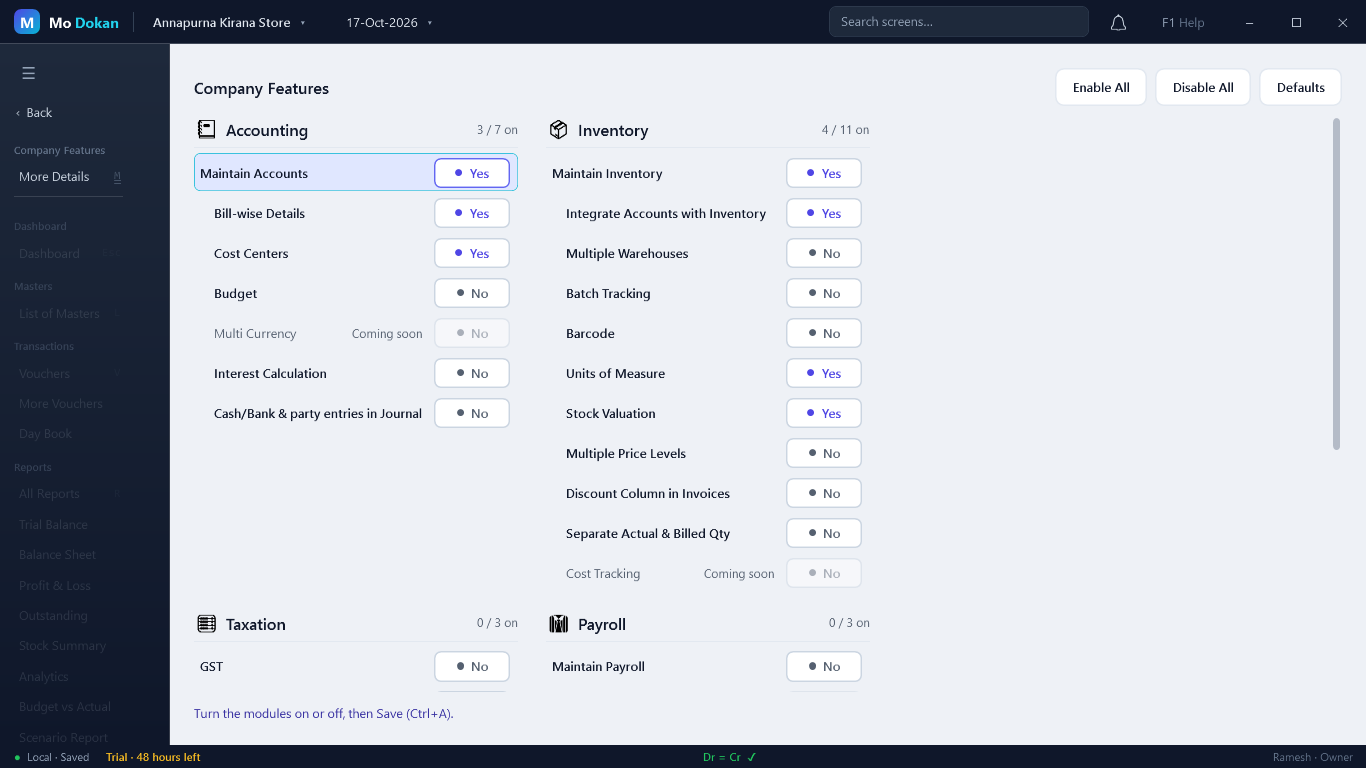
- Press F11.
- Move with the arrow keys and press Y for Yes or N for No — or click the switch. (Space does nothing here, so a feature is never flipped by accident.)
- Save with Ctrl+A.
RuleA feature with sub-features must be on for its sub-features to work — for example Batch Tracking needs Maintain Inventory. Features marked Coming soon cannot be switched on yet.
Accounting
| Feature | What it does |
|---|---|
| Maintain Accounts | The books themselves. On by default. |
| Bill-wise Details | Track each customer and supplier bill separately: which invoice is paid, which is overdue. Needed for outstandings and ageing. On by default. |
| Cost Centers | Split income and expenses by department, branch or project. On by default. |
| Budget | Set budgets and compare them with actual figures. |
| Interest Calculation | Work out interest on overdue bills and loans. |
| Cash/Bank & party entries in Journal | Allow cash, bank and party ledgers in a Journal. Off by default, because such entries belong in Payment, Receipt or Contra. |
Inventory
| Feature | What it does |
|---|---|
| Maintain Inventory | Stock items, quantities and stock reports. On by default. |
| Integrate Accounts with Inventory | The stock value in the Balance Sheet and Profit & Loss comes from your stock records. On by default. |
| Multiple Warehouses | Keep stock in more than one godown and move it between them. |
| Batch Tracking | Batch numbers, manufacturing and expiry dates. |
| Barcode | Barcodes on items. |
| Units of Measure | Units, alternate units and compound units. On by default. |
| Stock Valuation | Value stock by FIFO, weighted average and other methods. On by default. |
| Multiple Price Levels | Different selling prices (retail, wholesale…). |
| Discount Column in Invoices | A discount column on item lines. |
| Separate Actual & Billed Qty | Bill a different quantity from what was delivered (free items, for example). |
Sales, purchase, banking and more
| Feature | What it does |
|---|---|
| Sales Orders, Purchase Orders | Record orders and track what is still to be delivered or received. |
| Delivery Challan | Delivery notes before the invoice. |
| Credit Limit | Stop sales to a customer beyond their credit limit. |
| Banking, Bank Reconciliation, Cheque Printing | Bank ledgers, matching your books with the bank statement, cheques. |
| Bill of Materials, Production Orders | Manufacturing: make one item from others. |
| GST, TDS, TCS | Taxes. GST switches on by itself when the company's GST registration is Regular. |
| Maintain Payroll, Employees, Attendance | Staff, pay heads and attendance. |
| Audit Log, Edit Log | Record who changed what and when. |